KDS for Multi-Station Kitchens
In a multi-station kitchen, a KDS must coordinate separate teams without losing the order as a whole. The fryer, grill, preparation section and drinks station may finish at different times, but the customer receives o…
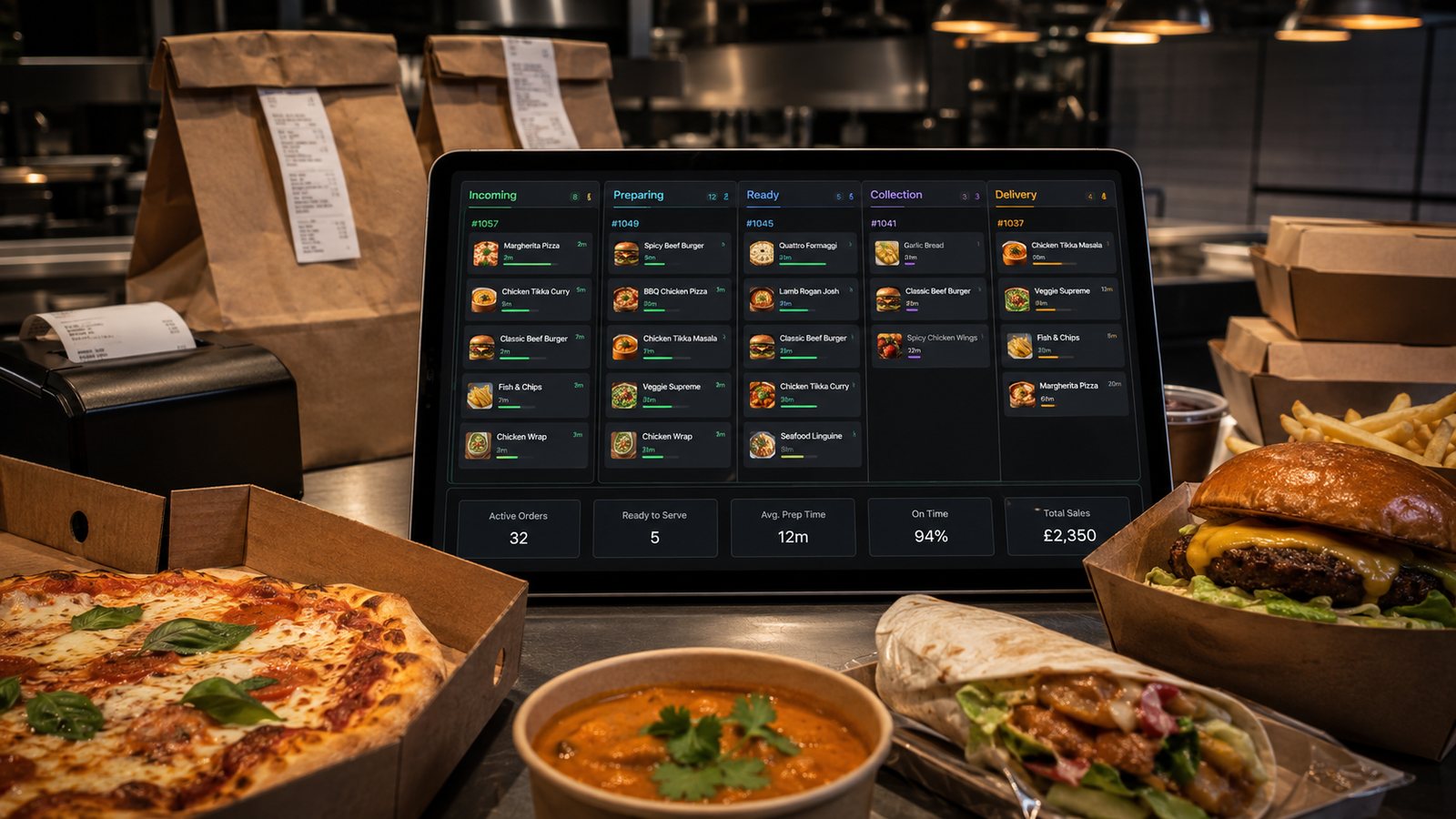
In a multi-station kitchen, a KDS must coordinate separate teams without losing the order as a whole. The fryer, grill, preparation section and drinks station may finish at different times, but the customer receives one order. The system must therefore manage both component work and final assembly.
Design station ownership
| Station | Typical responsibility | Key risk |
|---|---|---|
| Fryer | Fried items and batch timing | Food completed too early or held too long |
| Grill | Cook-to-order proteins and hot components | Variable preparation times |
| Preparation | Cold items, sauces, salads and assembly | Modifiers and dietary details missed |
| Drinks or desserts | Cold products and add-ons | Items omitted at packing |
| Expeditor or packing | Whole-order check and handover | Order marked ready with missing components |
Route components, not just products
A single menu item may contain several station tasks. Configure bundles, sides, drinks, dips, packaging and optional extras explicitly. Test every valid modifier combination and make sure deleted or substituted components disappear from the correct stations.
Use an expeditor view
The final view should show:
- all components and their status;
- critical modifiers and exclusions;
- delivery or collection;
- promised time;
- bags or packages required;
- customer or driver handover notes;
- delays and exceptions.
Only the expeditor or another clearly defined role should normally declare the whole order ready.
Coordinate timing between stations
Start-time rules should account for the slowest component, batch cycles and holding limits. Avoid using one nominal preparation time for all products. If one station repeatedly finishes much earlier, adjust sequence, capacity or menu promise rather than relying on staff to guess.
Handle shared equipment and bottlenecks
- Identify equipment used by several stations.
- Set capacity controls for fryers, ovens, grills or packing benches.
- Use throttling or later slots when the bottleneck is full.
- Give managers a controlled way to combine or close stations.
- Record changes so later analysis reflects how the kitchen was operating.
Design exception signals
Staff need a clear way to flag:
- ingredient unavailable;
- equipment failure;
- component delayed;
- order amendment;
- quality remake;
- driver or customer not ready;
- allergen-related escalation.
The signal should reach the expeditor and front-of-house without relying solely on shouted messages.
Keep screens usable during a rush
- Limit each station to relevant work.
- Make critical modifiers prominent but not visually indistinguishable from every ordinary note.
- Use consistent names across customer menu, POS and kitchen.
- Avoid too many priority colours.
- Provide a quick way to recall recently completed orders.
- Keep the touch or bump controls reachable without blocking preparation.
Test cross-station scenarios
- A normal order spanning all stations.
- A meal deal with a removed component.
- A delayed grill item while fryer items are nearly ready.
- A remake of one component.
- A cancelled order already active at several stations.
- A station screen or network failure.
- A temporary station closure.
- A large scheduled order alongside normal service.
Capacity controls for multi-station work
Whole-order capacity should reflect the constrained station, not the average kitchen. If the grill is full while preparation has space, accepting more grill-heavy orders can increase every customer’s wait. Use item or station load, later slots, menu restrictions or temporary channel pauses where the platform supports them.
Measure coordination rather than individual speed
- time from first component start to whole-order ready;
- orders waiting for the final component;
- components remade because another station was late;
- packing omissions;
- orders bumped and later recalled;
- station-level backlog during the peak;
- difference between ready status and actual handover.
Do not create incentives for one station to finish early if food then waits and quality falls.
Fallback in a multi-station kitchen
Decide whether a failed screen routes to another screen, a station printer or a central paper queue. The fallback must preserve component ownership and final assembly. A single emergency printer that produces an undifferentiated whole-order ticket may overload the wrong person unless the procedure is rehearsed.
Practical next step: follow one complex order from acceptance to handover and record every time a person must ask another station for status. Configure the KDS to remove the avoidable questions while preserving direct communication for genuine exceptions.
Related guides
- POS and Kitchen Systems — the main guide for the wider topic.
- Kitchen Display Systems — the broader guide that frames this implementation.
- Kitchen Display System Guide — a closely related operational control to review alongside this page.
- KDS Setup and Configuration — a closely related operational control to review alongside this page.
Operational, legal and platform requirements can change. Recheck official guidance and supplier documentation before altering a live service.
Related practical guides
 POS and Kitchen SystemsPrinter Setup and TroubleshootingA printer failure during service can hide orders, delay one kitchen station or create duplicate tickets. Troubleshooting should follow a fixed se…Read guide →
 POS and Kitchen SystemsOnline Menu Design MistakesAn online menu is part catalogue, part order form and part kitchen instruction. A design can look attractive while still causing abandoned basket…Read guide →POS and Kitchen SystemsKitchen Printers vs Customer ReceiptsKitchen tickets and customer receipts may originate from the same order, but they serve different users and should not be treated as the same doc…Read guide →
 POS and Kitchen SystemsKitchen Display System GuideA kitchen display system can improve visibility and order control, but only when it fits the kitchen’s workflow. Buying screens before mapping st…Read guide →POS and Kitchen SystemsKDS Setup and ConfigurationKDS configuration is an operational project, not a screen-installation task. The system must translate menu data into station work, show realisti…Read guide →POS and Kitchen SystemsInternet Connectivity for Takeaway OperationsTakeaway connectivity should be designed around continuity, not headline download speed. Online ordering, payment terminals, POS synchronisation,…Read guide →
Connect customer ordering with operations and profit
Use the wider guide library to check the menu, kitchen, fulfilment, payment and financial implications of each decision.
Browse all practical guides